# Integration with ShipBob

ParcelWILL Returns integrates with ShipBob to help you manage returned items and keep inventory in sync.

ShipBob is a global fulfillment provider that allows you to track returned items, update stock levels, and streamline your return process between your warehouse and store.

#### How to connect with ShipBob

1. In ParcelWILL Returns, go to **Integration**, look for **ShipBob** and click **Connect.**

<figure><img src="https://2400250274-files.gitbook.io/~/files/v0/b/gitbook-x-prod.appspot.com/o/spaces%2FzW1B3p8gnDnREcxBs7hB%2Fuploads%2FZq8ciVYNOZfedPYzP7Pz%2FGroup%201000003880.png?alt=media&#x26;token=c5289de3-515c-4355-a26c-949497650ec8" alt=""><figcaption></figcaption></figure>

2. Enter your ShipBob account API token. You can advice your ShipBob account manager.
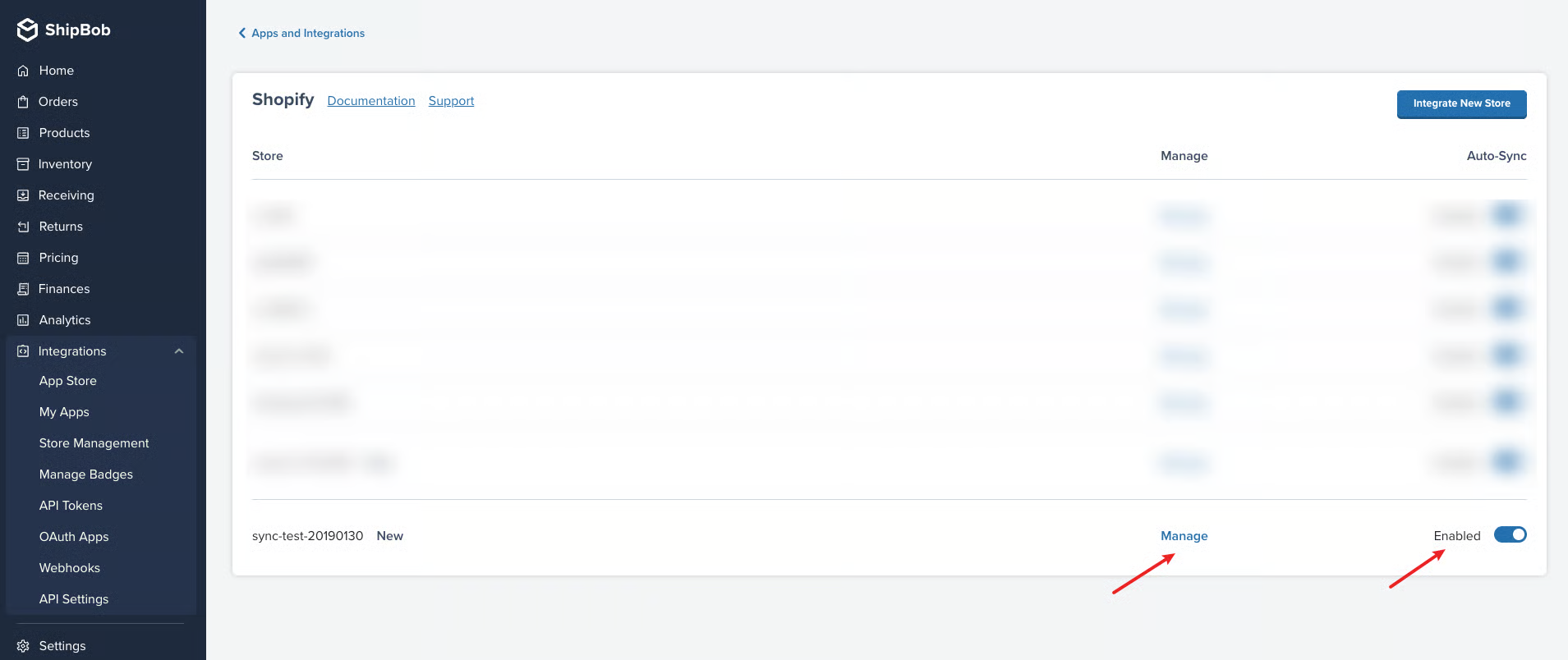
   1. In ShipBob, go to **Integrations** > **My Apps** > **Launch Shopify**, click **Integrate New Store**, add your Shopify Store URL.&#x20;
   2. Switch on and enable the related store.&#x20;
      1\.

      ```
      <figure><img src="https://2400250274-files.gitbook.io/~/files/v0/b/gitbook-x-prod.appspot.com/o/spaces%2FzW1B3p8gnDnREcxBs7hB%2Fuploads%2FSNkNIBZsydi2feUESY1u%2Fimage.png?alt=media&#x26;token=4d31358d-ffc6-4833-82e5-9194d374dc7a" alt=""><figcaption></figcaption></figure>
      ```
   3. Sync product: Click **manage**
      1\.

      ```
      <figure><img src="https://2400250274-files.gitbook.io/~/files/v0/b/gitbook-x-prod.appspot.com/o/spaces%2FzW1B3p8gnDnREcxBs7hB%2Fuploads%2FX6wfNvAj1HjjbupQxWWL%2FClipboard_Screenshot_1774609296.png?alt=media&#x26;token=cc161478-0f28-46fc-8f5e-ab53c6ebd45b" alt=""><figcaption></figcaption></figure>
      ```

      2\.

      ```
      <figure><img src="https://2400250274-files.gitbook.io/~/files/v0/b/gitbook-x-prod.appspot.com/o/spaces%2FzW1B3p8gnDnREcxBs7hB%2Fuploads%2FfM5PTZIIG7io0eszOte0%2FClipboard_Screenshot_1774609209.png?alt=media&#x26;token=a207f745-57bc-434f-9c54-615c22b71f6f" alt=""><figcaption></figcaption></figure>
      ```
3. In ShipBob, go to **Integration** > **API Tokens**, click **Generate New Token**, and copy the API token. Paste it in ParcelWILL Returns to connect.
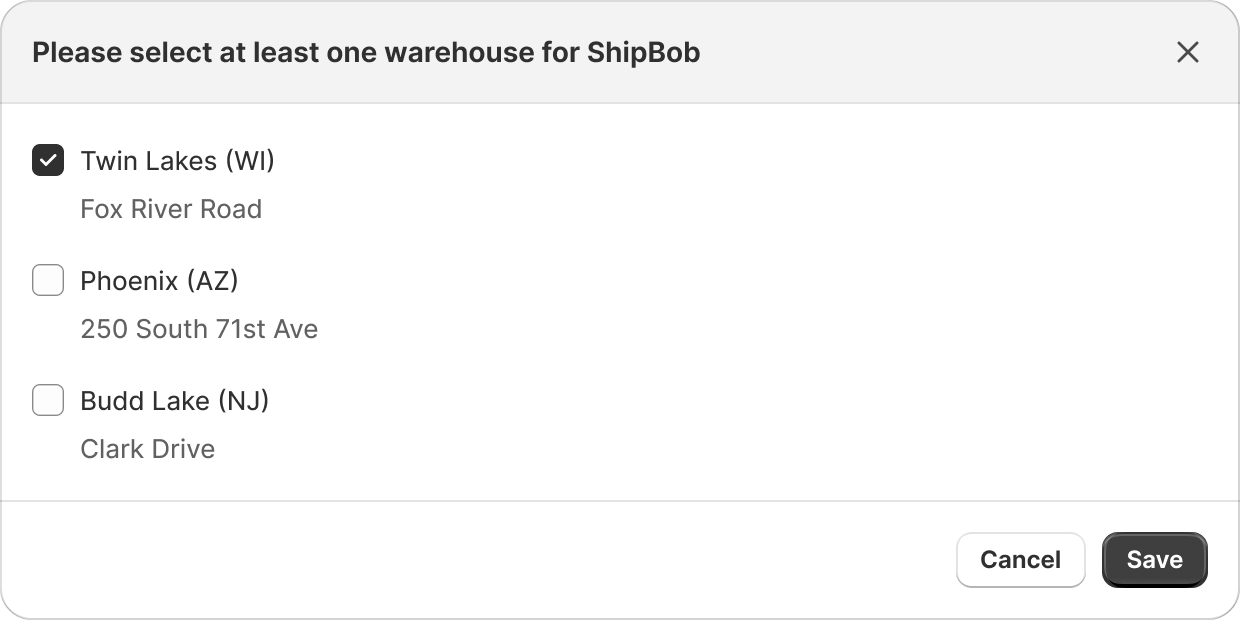
4. Once connected, Click **Select warehouse** for syncing location to ParcelWILL Returns.

<figure><img src="https://2400250274-files.gitbook.io/~/files/v0/b/gitbook-x-prod.appspot.com/o/spaces%2FzW1B3p8gnDnREcxBs7hB%2Fuploads%2FElUMZnNnJ8deWGIIZGNU%2FGroup%201000003881.png?alt=media&#x26;token=10a2e861-c280-4062-ac4e-93f01664b0a0" alt=""><figcaption></figcaption></figure>

4. Please select at least one location, remember to select the locations which are available for returns.&#x20;

<figure><img src="https://2400250274-files.gitbook.io/~/files/v0/b/gitbook-x-prod.appspot.com/o/spaces%2FzW1B3p8gnDnREcxBs7hB%2Fuploads%2F5oHypYHmlLUvl0OxJuHx%2FGroup%201000003891.png?alt=media&#x26;token=f33ff443-2b6c-48fe-89a7-e3c6045192d4" alt="" width="375"><figcaption></figcaption></figure>

5. Once saved, you will see the ShipBob is enabled.

<figure><img src="https://2400250274-files.gitbook.io/~/files/v0/b/gitbook-x-prod.appspot.com/o/spaces%2FzW1B3p8gnDnREcxBs7hB%2Fuploads%2FLDU4wl4jQeSk9jb2Doz1%2FGroup%201000003888.png?alt=media&#x26;token=539a9aaf-d30e-4013-b239-15c070ef9f7b" alt=""><figcaption></figcaption></figure>

#### How does the integration work?

1. When approving return, you can choose ShipBob location as for return location.

<figure><img src="https://2400250274-files.gitbook.io/~/files/v0/b/gitbook-x-prod.appspot.com/o/spaces%2FzW1B3p8gnDnREcxBs7hB%2Fuploads%2FcKXlP7G8BgxK8LbmBQSr%2FClipboard_Screenshot_1774607304.png?alt=media&#x26;token=11308676-36d8-4845-998f-4e5aef30a59f" alt=""><figcaption></figcaption></figure>

2. Once approved, ParcelWILL returns will create the return detail and sync it to ShipBob.

<figure><img src="https://2400250274-files.gitbook.io/~/files/v0/b/gitbook-x-prod.appspot.com/o/spaces%2FzW1B3p8gnDnREcxBs7hB%2Fuploads%2F22Yao6kC8NSCH0FeZ2pg%2FClipboard_Screenshot_1774607469.png?alt=media&#x26;token=b5571a2b-4663-4a2d-bfdd-8ae9e531ca9c" alt=""><figcaption></figcaption></figure>

3. ShipBob warehouse will receive the return package and update the status.&#x20;
4. ParcelWILL returns will fetch from ShipBob every 3 hours to look for received status.&#x20;
5. ParcelWILL will mark the return as **fully received** when all items received at ShipBob.